Category | DevOps
Last Updated On 06/03/2026
Software teams today face a simple but frustrating problem: releases must happen faster, systems must stay stable, and manual processes slow everything down. That’s exactly why DevOps tools have become essential in modern development environments.
Instead of relying on manual deployment or fragmented workflows, teams now build automated pipelines using integrated DevOps tools. These platforms support collaboration, automation, monitoring, testing, and deployment across the entire software lifecycle.
This guide explains the top DevOps tools used by modern teams in 2026 and how they fit together to create efficient development pipelines.
TL;DR – DevOps Toolchain Overview
Tool Category |
Popular Tools |
Purpose |
|---|---|---|
CI/CD Automation |
Jenkins, GitHub Actions |
Automate build and deployment pipelines |
Containerization |
Docker |
Package applications into portable container |
Container Orchestration |
Kubernetes |
Manage and scale containerized workloads |
Infrastructure Automation |
Terraform, Ansible |
Provision and configure infrastructure automatically |
Monitoring |
Prometheus, Grafana |
Track system health and performance |
Logging & Testing |
ELK Stack, Selenium |
Debug applications and automate testing |
Modern development teams combine multiple DevOps tools to build scalable automation pipelines and maintain reliable software delivery.
Selecting the right DevOps tools depends on the organization’s technology stack, team structure, and development goals.
Not every team needs the same toolchain. However, several factors help teams choose the most suitable tools.
Key criteria include:
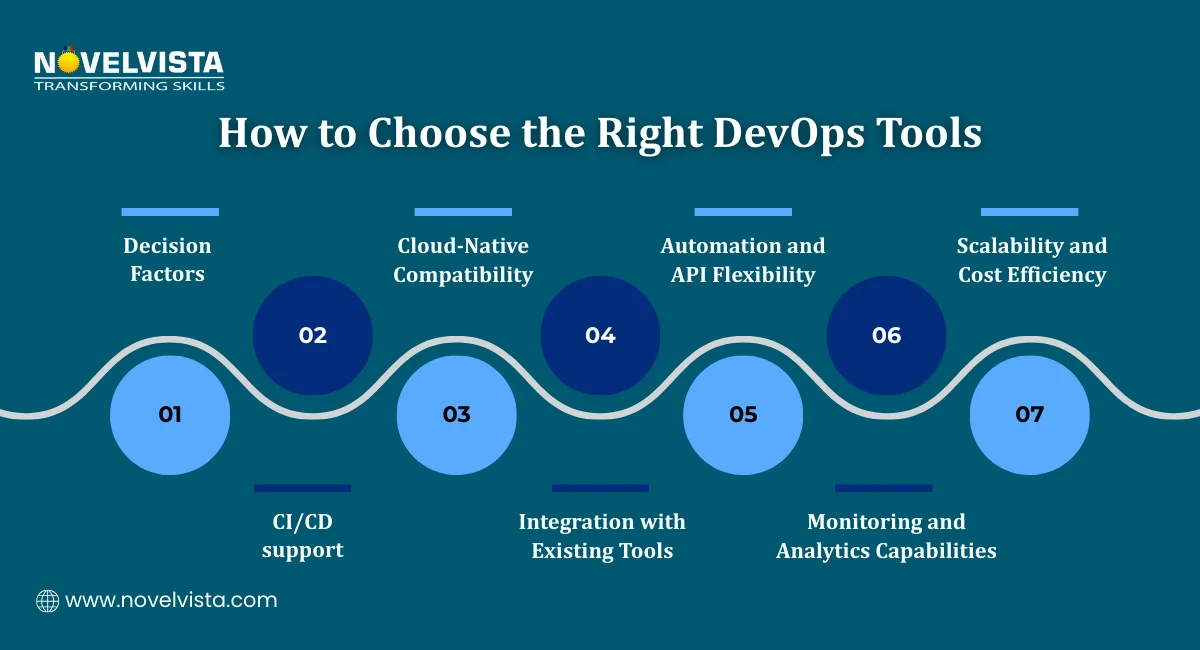
CI/CD Pipeline Support: Continuous Integration and Continuous Deployment are central to DevOps practices. Tools should automate builds, testing, and deployment workflows.
Cloud-Native Compatibility: Modern applications often run on cloud platforms. Tools must support containerized workloads and distributed infrastructure.
Integration Capabilities: The most effective DevOps tools integrate easily with other platforms such as version control systems, monitoring tools, and cloud services.
Automation and APIs: Automation features and strong APIs allow teams to customize workflows and integrate additional services.
Monitoring and Analytics: Reliable DevOps monitoring tools provide insights into application performance and system health.
Cost and Scalability: Teams should evaluate licensing costs, scalability options, and long-term operational overhead.
Research suggests that around 70% of teams select tools primarily based on ecosystem compatibility, meaning tools that work well with existing platforms.
During DevOps architecture workshops, organizations typically shortlist tools based on integration capability with existing CI/CD pipelines, cloud platforms, and monitoring systems used in production environments.
Choosing the right DevOps tools list helps teams create a stable and scalable development environment.
Modern DevOps environments typically rely on multiple platforms working together.
A well-designed DevOps tools list usually includes tools for:
Continuous integration and deployment
Infrastructure automation
Container orchestration
Monitoring and logging
Testing and quality assurance
The following platforms represent some of the best DevOps tools widely used in 2026.
Each tool supports a different stage of the development lifecycle, helping teams automate workflows and improve software reliability.
1. Jenkins – Leading DevOps Deployment Tool for CI/CD
Jenkins remains one of the most widely used DevOps deployment tools for building automated CI/CD pipelines.
It is an open-source automation server designed to manage software build and deployment workflows.
Jenkins allows teams to:
Automatically build code after every commit
Run automated tests
Deploy applications to development, staging, or production environments
One of Jenkins’ biggest advantages is its plugin ecosystem. The platform supports more than 1000 plugins, allowing integration with cloud platforms, version control systems, and monitoring tools.
Because of its flexibility, Jenkins often acts as the central automation engine within many DevOps tool ecosystems. Adoption statistics also show its continued popularity. Around 45% of DevOps teams still rely on Jenkins for CI/CD automation.
This makes Jenkins one of the most recognized platforms among top DevOps tools for software delivery automation.
2. Docker – Essential Containerization Tool in DevOps
Docker changed how applications are packaged and deployed.
Instead of installing software directly on servers, Docker packages applications and their dependencies into lightweight containers. These containers ensure applications behave consistently across development, testing, and production environments.
Docker provides several benefits for DevOps teams:
Portable application environments
Simplified dependency management
Faster deployment workflows
Because containers isolate application dependencies, developers avoid the common problem where applications run differently on different machines.
Docker is therefore included in nearly every DevOps tool list.
Many DevOps automation tools and pipelines rely on Docker to create containerized application images before deploying them to cloud infrastructure. As container adoption continues to grow, Docker remains one of the best DevOps tools for consistent application deployment.
3. Kubernetes – Container Orchestration Platform
While Docker packages applications into containers, Kubernetes manages those containers at scale.
Kubernetes is an open-source orchestration platform used to deploy, manage, and scale containerized applications.
It automates tasks such as:
Container scheduling
Auto-scaling applications
Self-healing container restarts
Load balancing between services
Kubernetes is especially useful for microservices architectures, where applications consist of many independent services.
Modern enterprises rely on Kubernetes as part of their DevOps deployment tools strategy for managing large-scale production environments. Performance studies show that Kubernetes can reduce deployment time by up to 40% in production environments.
In advanced DevOps implementation workshops, Kubernetes clusters are often configured with automated scaling policies to handle workload spikes without manual infrastructure intervention.
4. Terraform – Infrastructure as Code Automation Tool
Infrastructure provisioning used to involve manual server configuration, which often led to inconsistencies.
Terraform solved this problem by introducing Infrastructure as Code (IaC).
Terraform allows teams to define infrastructure using configuration files. These files describe cloud resources such as servers, networks, and storage.
Once defined, Terraform automatically creates and manages infrastructure across multiple cloud providers.
Benefits include:
Version-controlled infrastructure
Automated resource provisioning
Multi-cloud compatibility
Terraform is widely used as part of DevOps automation tools pipelines, especially in organizations managing large-scale cloud infrastructure. Enterprise adoption has grown significantly, with around 65% of organizations using Terraform for infrastructure automation.
Because of its flexibility and scalability, Terraform remains one of the most important DevOps tools for cloud infrastructure management.
5. Ansible – Configuration Management and Automation Tool
Ansible is a powerful platform for automating system configuration and application deployment.
Unlike some other configuration tools, Ansible uses a simple architecture without requiring agents installed on every system. Instead, it uses lightweight automation scripts called playbooks, written in YAML.
Ansible allows teams to:
Automate server configuration
Deploy applications consistently
Manage infrastructure updates
Its simplicity makes it popular among teams looking for lightweight DevOps automation tools. Ansible also integrates well with other DevOps tools, including Jenkins and Terraform.
In automation labs conducted during DevOps programs, teams often automate routine server configuration tasks across dozens of systems using reusable Ansible playbooks.
6. Prometheus and Grafana – Monitoring Tools in DevOps
After deployment, the next challenge is visibility. Teams must understand how systems behave in production. This is where DevOps monitoring tools become essential.
Two widely used monitoring tools in DevOps are Prometheus and Grafana. Together, they provide strong observability for applications and infrastructure.
Prometheus – Metrics Collection
Prometheus focuses on collecting time-series metrics from systems and applications.
It continuously gathers data such as:
CPU and memory usage
Application response times
Error rates
Infrastructure health metrics
Key advantages of Prometheus include:
Real-time metric collection
Flexible query language for analysis
Strong integration with Kubernetes and cloud platforms
Because of its reliability and scalability, Prometheus is widely used in modern DevOps tools ecosystems.
Grafana – Visualization and Alerting
Prometheus collects the data, but teams still need a clear way to interpret it. Grafana solves this problem by turning raw metrics into visual dashboards.
Grafana helps teams:
Create real-time performance dashboards
Track service-level metrics
Configure alerts when thresholds are exceeded
When combined, Prometheus and Grafana form a powerful monitoring stack.
Industry insight: Prometheus powers monitoring for nearly 60% of container environments, making it one of the most popular DevOps monitoring tools today.
7. Git and GitHub Actions – Version Control and CI/CD Automation
Every DevOps pipeline starts with code management. Developers need a reliable system to track code changes and collaborate efficiently.
Git – The Foundation of DevOps Workflows
Git is a distributed version control system that enables collaborative software development.
Key capabilities include:
Tracking code changes across versions
Supporting branching and merging workflows
Enabling pull requests and peer code reviews
Git platforms such as GitHub, GitLab, and Bitbucket allow teams to manage repositories and collaborate on projects.
Git therefore forms the foundation of many DevOps tools and pipelines.
GitHub Actions – Automated CI/CD Workflows
GitHub Actions extends Git by enabling automation directly inside the repository.
Teams can automate workflows such as:
Running tests when code is committed
Building application artifacts
Deploying software to staging or production
Because it integrates directly with GitHub repositories, it is widely used among DevOps deployment tools.
In DevOps pipeline training labs, integrating Git repositories with automated workflows often enables teams to trigger builds and tests within seconds of code commits.
8. ELK Stack and Selenium – Logging and DevOps Testing Tools
Reliable systems require two things:
Detailed system visibility
Automated testing pipelines
Two platforms that support these capabilities are the ELK Stack and Selenium.
ELK Stack – Log Monitoring and Analysis
The ELK Stack is widely used for centralized logging and system observability.
It consists of three components:
Elasticsearch – Stores and indexes log data
Logstash – Collects and processes log data
Kibana – Visualizes logs through dashboards
Together, these tools allow teams to:
Detect application failures
Investigate system behavior
Analyze operational trends
The ELK Stack integrates with many DevOps monitoring tools and environments, making it an important part of modern observability strategies.
Selenium – Automation for Application Testing
Testing is another key component of DevOps pipelines.
Manual testing slows down development and increases the chance of production issues.
Selenium is one of the most widely used DevOps testing tools for automating browser testing.
It helps teams:
Run automated UI tests
Perform regression testing
Validate application behavior across browsers
When integrated into CI/CD pipelines, Selenium ensures every code update is tested before deployment.
This makes it one of the most valuable DevOps testing tools in modern development workflows.
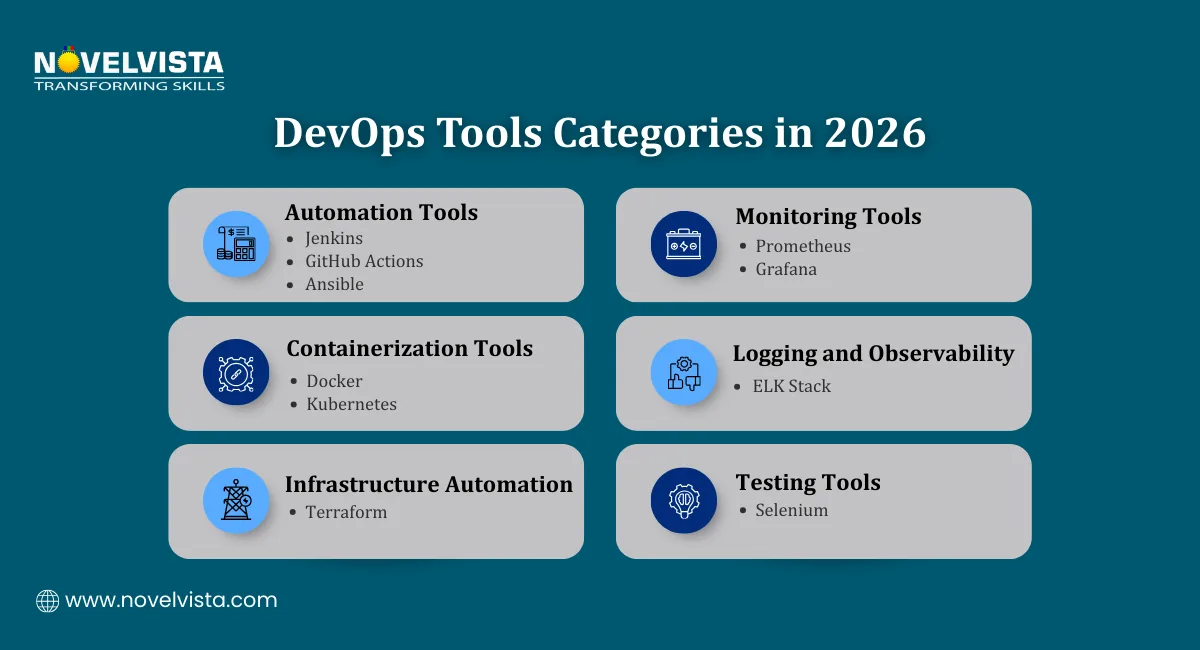
Modern DevOps environments rely on integrated toolchains rather than single platforms.
A typical DevOps tools list often includes tools for:
Several industry reports highlight how widely these platforms are used.
Organizations that combine automation, monitoring, and deployment platforms build faster and more reliable development pipelines.
Discover essential DevOps tools, a step-by-step learning path,
key certifications, and a practical career roadmap to start and grow your DevOps career.
The top DevOps tools used today support automation across the entire software lifecycle.
Each category of tool plays a different role:
CI/CD tools automate build and deployment pipelines.
Infrastructure automation tools manage cloud resources efficiently.
Monitoring platforms track application health and performance.
Testing tools ensure software quality before release.
When organizations combine DevOps automation tools, DevOps deployment tools, and DevOps monitoring tools, they create a complete DevOps ecosystem.
Across enterprise DevOps training programs, organizations consistently adopt integrated toolchains rather than single tools to maintain reliable automation, monitoring, and deployment workflows.

Next Step: Start Your DevOps Learning Journey
If you want to understand how modern teams use DevOps tools in real environments, NovelVista’s DevOps Foundation Certification Training Course is a great starting point. The program explains DevOps principles, automation strategies, CI/CD pipelines, and toolchain integration through practical learning. It helps professionals build the knowledge needed to work confidently with DevOps environments and support modern software delivery practices.
Author Details

Confused About Certification?
Get Free Consultation Call
Stay ahead of the curve by tapping into the latest emerging trends and transforming your subscription into a powerful resource. Maximize every feature, unlock exclusive benefits, and ensure you're always one step ahead in your journey to success.